
 Phantom by Fadelab ↗AI AUDIO ENGINEERING / 2026
Give a mixing decision something concrete to work from.
Phantom is a free, open-source audio analysis toolkit I designed to provide measurable information to an AI assistant and keep the musical decision in the hands of the person listening.
- Role
- Creator, product design and agentic development
- Platforms
- CLI and MCP clients · REAPER integration · Browser demo
20 tools · 5 audio skills · Open source
- MY ROLE
- Product direction · Interaction design · Visual design · Agentic development
- STATUS
- Audio toolkit + five skills released · Studio preview
INTERACTIVE LISTENING CONCEPT
Follow the sound.
Try the next move.
This presentation string together actual audio playback, stored Phantom measurements and a scripted guide to demonstrate a presentation direction.
Real playback and controls, with a scripted guide and saved Phantom analysis. The 3D layers use measured audio envelopes with illustrative spatial effects. The EQ is a prepared render you can audition and undo.
THE LISTENING PROBLEM
The problem
A musician can sense something that needs fixing without knowing what measurement could frame the reasoning. Analysis can turn into a layer of work when the result produces a wall of decisions with no connection to addressing the stated issue.
I focused the flow on inspecting the audio, identifying an issue, comparing relevant evidence and selecting an adjustment. The measurements make a recommendation something the person can question.
FRAMING THE WORK
Use a reference as context
Comparing a mix with a reference provides a musician with a particular difference to listen for. It does not establish a generic score for a good mix, where the meaning of the difference depends on the genre, arrangement and intent.
A specific passage
Start with where the problem happens, not an average for the whole song.
Evidence you can inspect
Read the spectrum, level and stereo information alongside the musical concern.
A suggestion you can test
Try one change and compare it with the original before deciding what to keep.
Research context: reference targets in true:level ↗ · measurement states and reports in Youlean ↗
DESIGNING THE AI WORKFLOW
Measurements before advice
Phantom's toolkit covers loudness, frequency balance, phase and masking. Its audio engineering skills guide an assistant through diagnosis, session planning, mixing, effects and mastering. The tools provide observations that can inform the discussion.
I designed for the musician to retain the final call. A measurement can identify a difference or potential problem, but the intent matters.
Choose a stage to explore a workflow example. These examples explain the guidance; they do not run an analysis.
Audio diagnostician
What needs attention before I mix?
- Measure
Check clipping, noise, phase and overlap between stems.
- Interpret
Rank findings by severity and confidence, with the instrument and genre in mind.
- Try
Resolve the first supported issue with available DAW controls or manual steps.
- Recheck
Analyze the affected audio again before moving down the list.
Phantom measures local audio. An AI assistant calls its tools through MCP, then uses the skills to interpret the result. Separate REAPER or Ableton bridges can carry supported changes into a session. The command line and Python are alternate entry points.
I made comparison part of the guidance: propose a small, reversible change, export the same passage again, then compare at matched levels. The musician decides whether to keep it.
ONE CUE / THREE QUESTIONS
Show the reading
with its meaning.
I wanted each recommendation to carry something the person mixing could inspect. This cue shows why the reading and its interpretation need to stay together: a level, a stereo relationship, and a detector flag each answer a different question.
Original synthesized instrumental. No speech. Playback uses a prepared copy; the readings below come from analysis of the original WAV.
Loudness needs a reference.
Integrated loudness describes the whole cue. Its true peak is −1.26 dBTP. I keep these readings beside their interpretation so a person can compare levels without treating a loudness target as a judgment of the music.
Integrated loudness · True peak −1.26 dBTP
Measured with Phantom on Oct 9, 2026. Original portfolio cue; separate from the fixed fixture shown in the Studio image. How the analysis works ↗
RELEASED CORE / DESIGN THROUGH ITERATION
Fit the existing workflow
The released toolkit exposes command-line, Python and MCP interfaces. Individual REAPER and Ableton bridges expose supported actions to those environments. A change can be followed by another analysis and listening check to see if it improved the result.
01 / Keep the original
Your source stays untouched. It remains the reference for every decision.
02 / Make a separate trial
Apply one proposed change to a new WAV. The first idea can be rejected without losing the source.
03 / Compare, then choose
Measure the new file and listen to the same passage at matched levels. Keep it, revise it, or return to the original.
I wanted each suggestion to be specific enough to check. The guidance now distinguishes definite, likely, and possible findings, and includes a fallback when the first move does not help. That gives the engineer a reason to try something and a way to question it.
Read the released guidance changes ↗A SMALL LABEL / A DIFFERENT DECISION
Two missing values.
Different consequences.
The mid/side ratio in decibels can be undefined for both a mono signal and a fully inverted stereo signal. Showing “no value” for both hides a difference that matters during playback.
- Pure mid
- Centered content only. It remains audible when summed to mono.
- Pure side
- Opposing left and right content. It cancels when summed to mono.
The released core names these states separately. Keeping the meaning alongside the missing number lets an engineer distinguish a narrow signal from one that disappears in mono.
Read the measurement update ↗STUDIO / INTERFACE PREVIEW
Keep the product boundaries clear
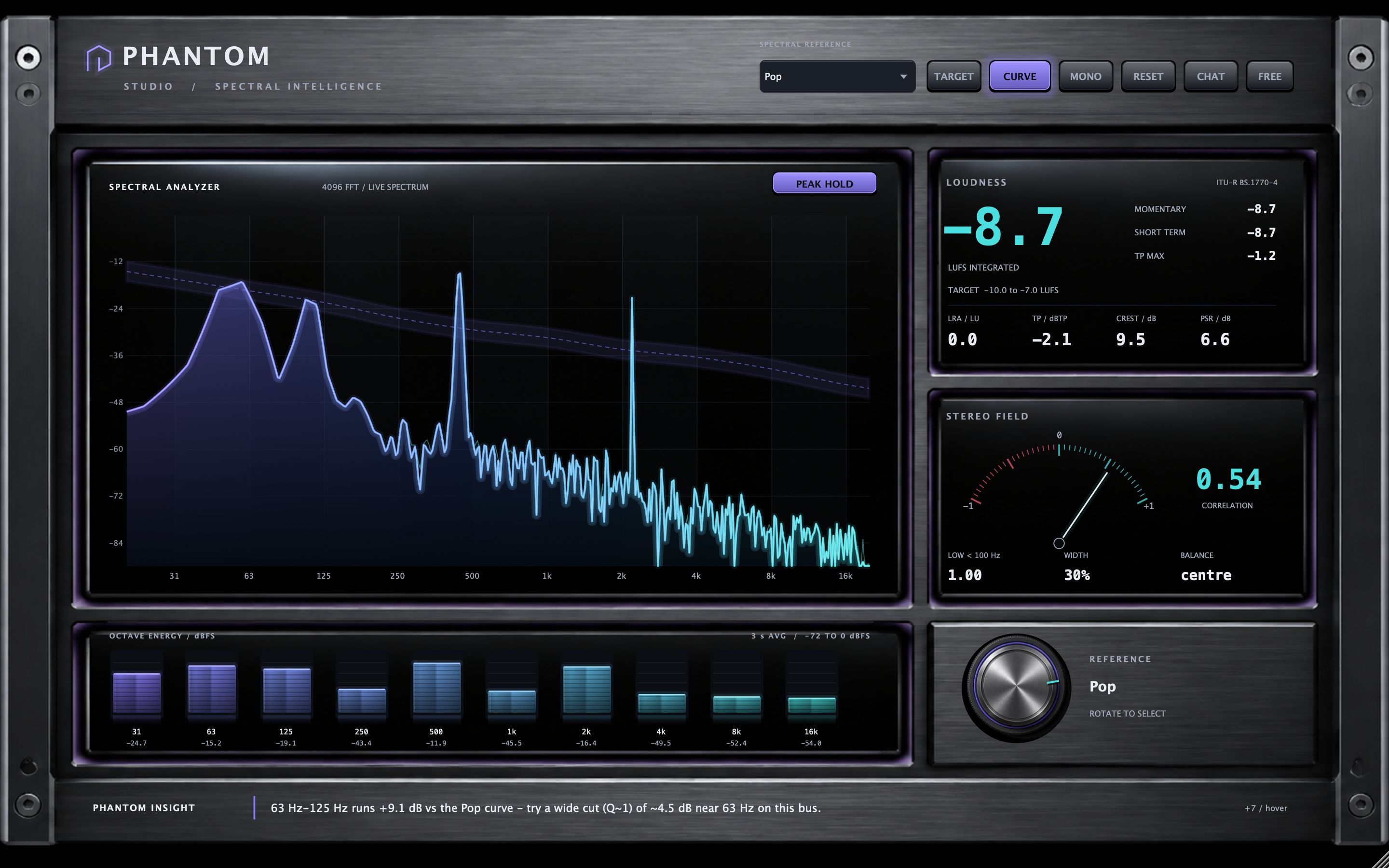
Phantom's core toolkit is released and open source. Phantom Studio is a separate desktop preview providing live spectrum and stereo monitoring. The Studio AI chat shown in the prototype is scripted and should not be mistaken for a working conversational assistant.
Depth around the data.
Early perspective treatments changed how the spectrum appeared. I kept the frequency display face-on and put the depth into glass, light, and recessed panels around it. The material treatment could then develop without distorting the measured geometry.
A reference you can see.
The dial selects the analysis reference. Its position makes the current comparison context visible, and it stays synchronized with the dropdown. It does not apply EQ to the audio.
Group what belongs together.
Recessed panels gather related measurements, and illumination marks active states. Separate labels and scales distinguish correlation, level, and band energy so the physical styling does not imply that every meter measures the same thing.
THE WORK IN MOTION
Inside the Studio interface preview.
Read the video description
A recorded tour of Phantom Studio’s audio analysis interface: spectrum, loudness, stereo information, and reference controls. The film pairs the editor with an original musical demonstration, a scripted mock AI chat response, and a design-prototype workflow. It does not demonstrate a production AI service.
NEXT / THE CHANGE AND THE WAY BACK
Design the change
and the way back.
The proposed Studio workflow starts with one change. Show what would happen, ask for confirmation, retain the previous state, then compare the same passage afterward. The engineer can keep the change or return to the earlier state.
I want that comparison and return path to sit beside the action. Experimenting with a mix should leave the engineer able to judge the result and recover the sound they had before.
This is the proposed Studio action flow. Current Studio chat is advisory; connected DAW control is separate work. The film does not show a saved DAW change.
WHAT EXISTS / WHAT COMES NEXT
What I'd test next
I'd ask individual musicians to use the measurements to explain a problem and select an initial adjustment. The question is whether the analysis is informing a useful decision without needing the user to become an audio measurement expert.